Antivirus & online security
XShield Antivirus Review
Consider a single security-suite subscription for multiple devices. Review XShield’s advertised protection, platform claims and monthly-versus-yearly options before choosing your plan.
Checked November 1, 2026. Yearly listing: $149.99; confirm your offer.
We may earn a commission through our links, at no extra cost to you. How we compare.
Our take
Why consider XShield?
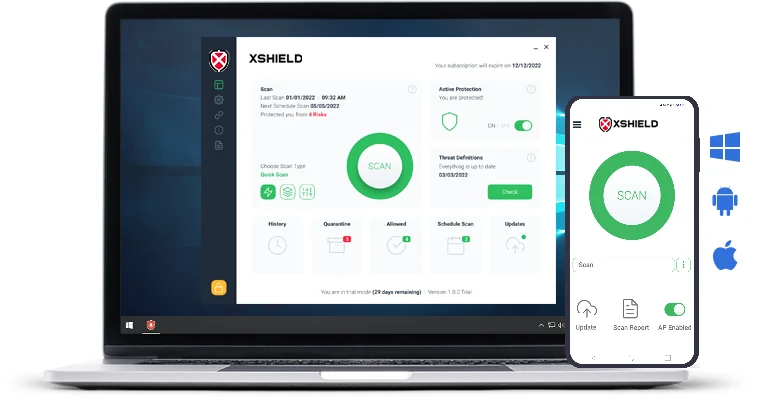
XShield is aimed at buyers who prefer an advertised all-in-one security package with a broad device allowance. The provider describes antivirus, web protection, automatic updates and support across major desktop and mobile platforms.
One advertised package
Compare the security and privacy tools listed for the subscription.
A broad device allowance
The pricing page advertises unlimited devices under the plan.
A choice of billing term
Select monthly or yearly billing according to how long you want to commit.
Our buying recommendation is to match those claims to your actual devices and desired workflow. If the available apps and included tools fit, the single-package structure may be appealing. Confirm the entitlement and operating-system requirements before choosing the term.
Plan comparison
Monthly or yearly: compare the full commitment
| Option | Amount checked | How to compare it |
|---|---|---|
| Monthly | $14.99 per month | Lower initial billing commitment; check renewal terms |
| Yearly | $149.99 per year | A larger single-term charge; compare the full annual total |
These amounts were displayed on the pricing page on November 1, 2026. The page advertises the Security Suite and unlimited devices for both options. Promotional text and checkout terms can change, so confirm the total due and future billing before paying.
Choose a term according to how confident you are that the package fits. A yearly total can be useful to compare with twelve monthly payments, but it represents a different up-front commitment. Keep the selected plan name and billing details with your order confirmation.
Choose your XShield protection
Check the current offer, select the right edition and activate the features you want to use.
Check XShield plansConfirm the device allowance, billing term and renewal price at checkout.
What is included
Understand the advertised protection layers
XShield describes Active Protection for ongoing monitoring, Deep Scanning for files and apps, web protection for malicious sites and phishing attempts, and automatic updates. These are provider-reported capabilities rather than findings from a test we performed.
The FAQ also describes a VPN as part of the wider security suite. Confirm that it is included and available in the exact subscription and apps you select. A feature mentioned elsewhere on a website is most useful when it is clearly part of your order.
Consider which functions would improve your current setup. If you already have a VPN or password-related tools, compare the overlap rather than assuming every additional feature adds equal value. A simpler set of services can be easier to keep configured.
Compatibility
Verify your device mix before choosing the term
The provider lists Windows, macOS, Android and iOS. That describes the platforms it markets to; it should not be read as a guarantee that every operating system has identical scanning or privacy features. Check the exact app and supported version for each device you want to cover.
For a computer-and-phone household, ask specifically about the desktop scanning tools and the mobile features you will receive. On an iPhone, a security app’s available functions differ from system-wide desktop file scanning.
After purchase, follow the provider’s download and activation instructions. Use the account associated with your order, confirm that the selected subscription appears and review the status on each intended device. Keep a record of any setup guidance from support.
Before checkout
Check the bundle and support process
The pricing page advertises live chat, email and phone support. If support is important to your buying decision, check the available contact route and what help is included with your subscription. Avoid assuming that every support interaction or extra service is part of the base price.
Read the current billing, cancellation and any trial conditions shown in the offer. The phrase “risk free” in promotional material does not by itself describe how a cancellation or refund works. Keep the actual order and policy terms you rely on.
For a larger device mix, confirm the licence rules as well as the “unlimited” headline. The supported app, account structure and permitted use determine whether the package works for your situation.
Research notes
How we assessed the XShield offer
We reviewed the provider’s product, pricing and FAQ pages. We did not test its engine, measure resource use or independently verify a claim of superiority over competing software. XShield is not listed under that name in the selected AV-TEST Windows round; that is not evidence that it failed a test.
Our recommendation is therefore about the advertised package and whether it fits a buyer’s device and subscription preferences. If you need a specific benchmark or technical feature, obtain that information before choosing the plan.
If the available apps, scope and term suit you, compare the current offer and complete setup carefully. A useful purchase is one whose actual included features match what you expected to use.
Before you buy
Questions about XShield Security Suite
Does XShield advertise unlimited devices?
The reviewed pricing and FAQ pages advertise unlimited devices. Confirm the licence rules and available apps for your exact household before choosing a term.
Does every device get the same scanning features?
Do not assume identical functions across Windows, Mac, Android and iOS. Ask about the app and supported version for each device, especially the difference between desktop scanning and iPhone security features.
Is a VPN included?
The provider’s FAQ describes a VPN in the all-in-one suite. Confirm its inclusion and activation in the exact offer and app you choose.
What were the listed monthly and yearly prices?
On November 1, 2026 the pricing page showed $14.99 monthly and $149.99 yearly. Treat them as dated listing snapshots and check the current total, billing term and renewal conditions.
Has this review independently tested XShield?
No. This is a buying guide based on the provider’s published information. We have not benchmarked detection, performance or the advertised comparison claims.
Make an informed choice
Choose XShield when the published bundle fits your needs.
XShield is an option to compare if you want the provider’s advertised all-in-one package and broad device allowance. Confirm the actual app support and features on your devices, then choose the billing term that suits your commitment. Review the current offer and keep a copy of the plan details you select.
How this page was researched
About this review
This research-based buying guide compares published product, plan and support information. We have not tested the software hands-on. Buying recommendations are editorial judgments about features, device fit and subscription scope. Any named lab result is separate from our site scores.
Checked November 1, 2026 for U.S. shoppers. Plan examples and prices are dated snapshots. Confirm the edition and platform-specific features in your selected offer. Product images are credited to XShield.
No security product guarantees protection against every threat. Keep devices updated and use account-security practices alongside the tools you buy. Report corrections to compareanyth.ing@dooeeads.com.